 boojack
c5e7d65c12
Timestamp: the card timestamp was a button that navigated in script, so
it
had no URL preview and could not be opened in a new tab. It is now a
real
link that keeps the origin page and underlines on hover. On the memo's
own
page it renders as plain text, since the link would point at itself.

Action menu: ordered by how often each action is used, showing only what
applies:

- Owner: Open, Edit, Pin | Archive, one task action, Copy > (link,
  content),
  then More > (Move, Delete) when the memo can move, otherwise Delete.
- Archived: Restore | Delete.
- Comment: Edit | task action, Copy | Delete.
- Viewer: Open, Copy.

Open is a real link (new DropdownMenuLinkItem kit wrapper), hidden on
the
memo's own page. Check all / Uncheck all collapse into one item chosen
by
whether tasks are still open. Move only appears when there is a Space to
move to or leave, and a comment's copied link lands on the comment
inside
its parent memo.

Detail sidebar: remove the back-to-origin row. It duplicated browser
back
and the navigation above it, pushed a new history entry instead of going
back, sat inside the mobile drawer, and labelled most origins as Home.
Returning to the origin after archive or delete is unchanged.

Refs #6359
✨ Featured sponsor: CodeRabbit — Industry-leading AI code reviews.
Memos

Fast enough for every thought. Private enough for all of them.
Memos is an open-source, self-hosted home for short-form thinking. Daily notes, links, work logs, and snippets flow into a chronological Markdown timeline—on infrastructure you control, without the overhead of an all-in-one workspace.
Run with Docker · Try the live demo · Read the docs




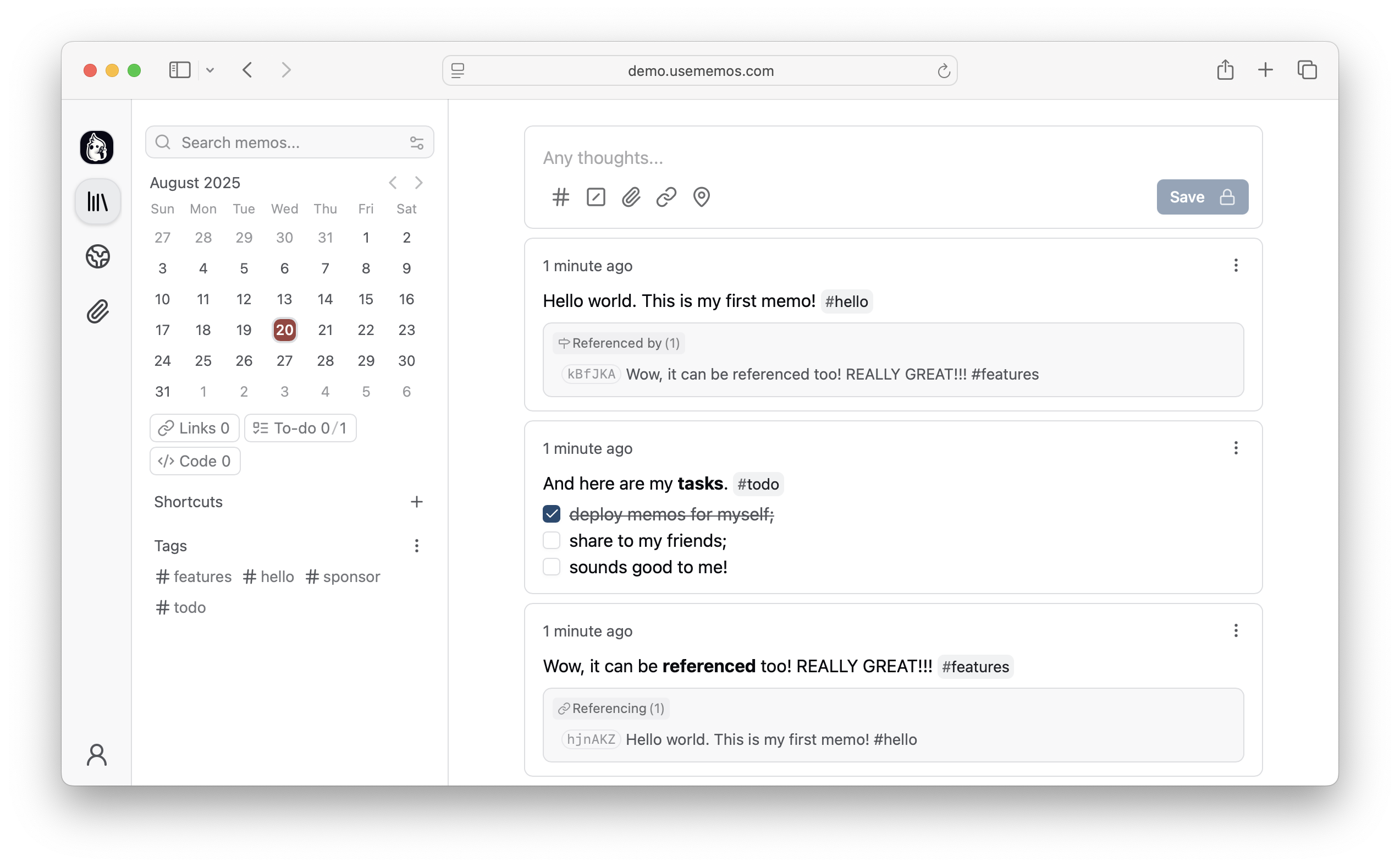
Why Memos?
- Capture quickly — Write in Markdown, attach media, and save without choosing a title, folder, or template.
- Organize lightly — Revisit notes through the timeline, search, tags, and pins.
- Share selectively — Keep memos private or publish only what you choose.
- Keep control — Self-host Memos with zero telemetry and MIT-licensed source.
Quick Start
Run Memos with Docker:
docker run -d \
  --name memos \
  -p 5230:5230 \
  -v ~/.memos:/var/opt/memos \
  neosmemo/memos:stable
Other install options are in the deployment guide.
Releases use YY.MM, with optional point releases such as 26.09.1 and release
candidates such as 26.09-rc.1. Calendar release tags have no v prefix. The Docker stable tag follows stable releases;
canary follows development builds. If upgrading from a release before v0.31.0,
run v0.31.0 successfully.
See the upgrade requirements for earlier versions.
Web Clipper
Save pages, selections, and images from your browser straight into Memos as source-linked Markdown. Get the Memos Web Clipper for Chrome or Firefox.
Sponsors


Love Memos? Sponsor the project on GitHub.
Get Help
Read the docs, join Discord, or ask in GitHub Discussions. Found a bug or have an idea? Open an issue. To contribute, see the contributing guide.